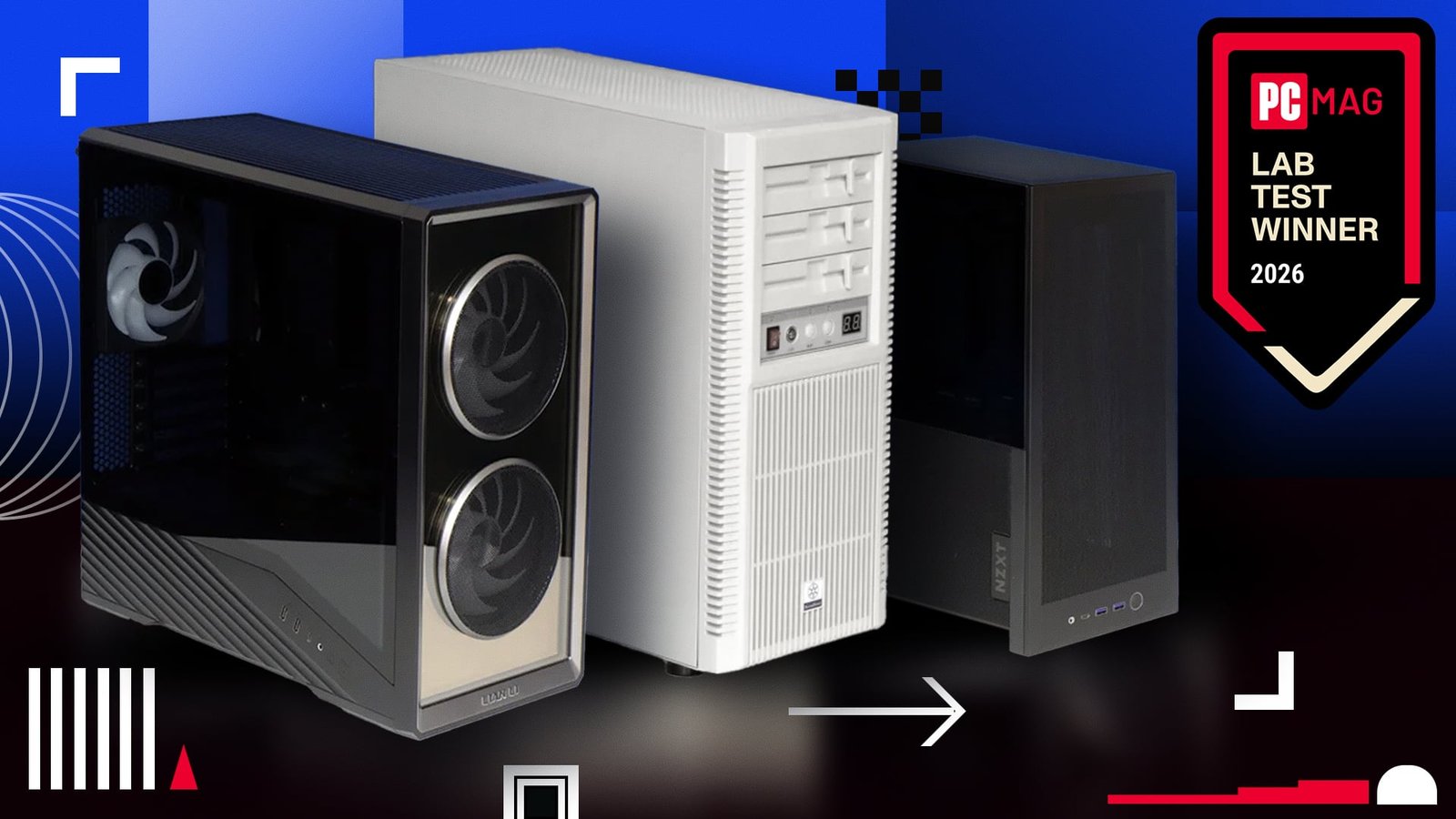
Testing PC cases is equal parts art and science. Whether you’re constructing or upgrading a PC, you’re a sample of one: Every PC builder or upgrader does their own thing, and no single process for building a PC will conform to everybody’s (or indeed anybody’s) master plan. A consistent set of components, a consistent way of measuring temperatures, and a consistent core configuration are key to drawing meaningful numbers from PC case testing. But in the end, of course, you do you when it comes to picking a case. Looks and numbers both matter.
Even so, some baseline data can help you shop for a desktop PC case—especially if acoustics, or how loud your PC operates, is a key concern to you. Measuring the sound that comes out of a PC chassis is nuanced, though, and changing even a single parameter matters a lot. In concert with PCMag contributor Thomas Soderstrom, we’ve been testing PC cases at PCMag for some years now, and we keep our test regimen and the battery of standard components we use up to date so our methodology remains current and meaningful.
That means, for our PC case reviews, we strive to use the same hardware components, configured as identically as possible, across all cases of a given form factor. For the purposes of this article, that encompasses 80 PC cases tested and reviewed from early 2024 to today. Most are still on the market. But before I dive into the winners (teaser: they’re from Lian Li, NZXT, and SilverStone), let’s grapple a bit with those testing nuances.
Testing PC Cases: It’s All About Consistency
PC cases come in three broad size classes, which refer to the biggest size, or “form factor,” of motherboard they can hold: ATX, MicroATX, and Mini-ITX. For a deep-dive rundown of all the factors that go into shopping for a PC case, as well as core connectivity, feature, and build considerations, check out our roundup of the best PC cases. You’ll see plenty of product recommendations there, including references to some of our winners here.
When we last revised our PC case testing methodology (in early 2024), we had already been following a very similar approach for some years. By then, though, our test components were aging out. Nvidia had introduced its GeForce RTX 40 series graphics cards, pushing new levels of heat output (and sheer card size) to warm up the innards of PC cases. Plus, our standard test CPU was getting a bit long in the tooth.
So we set out to acquire a robust, modern platform to use for testing across PC cases. That included a GeForce RTX 4070 Ti Verto card from PNY; a pair of high-wattage Cooler Master power supplies (one ATX format, the GX III Gold 850, used for most cases, and one SFX, the V 1100 SFX Platinum, for Mini-ITX cases that demand one); an MSI M470 Spatium 1TB M.2 PCI Express SSD to serve as the boot drive; and a Corsair iCue H100i RGB Pro XT 240mm liquid cooler. The last should fit in almost all modern cases from Mini-ITX up to ATX. (We also have a reserve AIO, the single-fan iCue H60i RGB Pro XT, for the rare case that can house only a single 120mm radiator/fan.)

(Credit: Thomas Soderstrom)
We also settled on a series of three motherboards. We did our best to find three almost-alike boards in the ATX, MicroATX, and Mini-ITX sizes—and only realized later how difficult that is! We locked in three different models from Asus: The biggest and the smallest (the ROG Maximus Z790 Dark Hero for ATX, and ROG Strix Z790-I Gaming WiFi for Mini-ITX) are decidedly gaming-oriented, while our MicroATX selection is the Prime Z790M-Plus, a crossover gaming/mainstream board. We opted for Intel this time, and our test CPU in all cases is an Intel Core i7-13700K. And the memory kit is a Patriot Viper DDR5 kit configured to 6,000MHz. Really, the only two variables from case to case might be the motherboard (matched to the largest supported board for the case) and whether the power supply is ATX or SFX.

(Credit: Thomas Soderstrom)
Even though we have kept our components as consistent as possible, it’s sensible to compare cases of a given size class only to others of the same size class. A compact Mini-ITX case will generally come with (and support) fewer fans than a sky-high ATX mega-tower. Also, while a case’s acoustic traits and those of its fans are major variables, six installed fans will generally be louder than a single fan. But a couple of fans in a very small case, working hard, can be much louder than a bank of fans in a larger case spinning more slowly.
Another factor: Our hot-running test GPU and our AIO CPU cooler have their own fans. Their sound gets masked more or less effectively, depending on case space, sound-deadening material, and much more. It’s all about the environment, the design…and the nuances. This is why we test.
The Fan Question: What Is the Sound of No Fans Spinning?
If you’re testing PC cases, you quickly come to a philosophical fork in the road. The PC case you buy (or as reviewers, the cases we source from manufacturers) will come with a complement of fans to fill all the fan-mounting spots, some of the spots, or sometimes, none of the spots. In the real world, if you buy a PC case that doesn’t have the fans that you want installed, you end up filling some or all of those mounting spots with aftermarket fans and maybe a liquid cooler. Or, if you buy a case with pre-installed fans, you’ll know that going in, and you’ll likely work with what you’re given. (Otherwise, why toss aside fans you already paid for?)
The possible combinations of aftermarket fans, components you install, and other variables are practically endless, making it hard to determine the right way to test a PC case that will serve everyone well. Should we test the case with every fan mounting point filled with a fan or a radiator? If we do, should we use identical fans from the same manufacturer? How to choose which ones, if the vendor offers several lines of fans but includes none? Or should we simply test the case with the fan configuration as it comes out of the box?
We’ve opted for that latter approach, in part because we cannot predict what any given PC builder will do. We can only control for the standard components that we carry from test to test.

(Credit: Thomas Soderstrom)
That, however, creates a dilemma. Some PC cases ship with no fans at all, expecting you to fill their fan positions with the liquid cooler and fans that you like. Other cases come with a unified set of fans in all or most positions, sometimes pre-wired for ease of building. They are usually a brand of fans from the case maker. That’s fine too. In testing a case that has no fans pre-installed, however, the sole fans that end up in the PC using our test hardware are the ones on our liquid CPU cooler’s AIO radiator, the fans on the graphics card, and the fan in the power supply.
That can give cases with no additional fans an intrinsic sound advantage, all else being equal. With fans mounted in the usual positions on a case, some of the sound you hear comes from their bearings and from their airflow traveling through the case vents. Also, five fans spinning at the same rate in the same case will push a lot more air, and often more noise, than a single fan in the same situation, spinning at the same rate.
Of course, none of this is that simple; a single fan in a thermally constrained environment might be forced to work harder, spin faster, and produce more sound than multiple fans sharing the thermal load. And then, there’s the noise generated by the other parts inside.
To that end, we control (as much as possible) for the workload and the testing environment. And for the purposes of our Lab Awards here, we’ll be putting aside any cases that come with no fans in the box. Why? For the simple reason that, in almost all situations, no one will run a PC like that without adding more case fans in the real world, and any added fans will necessarily be an arbitrary selection. (That’s unless the case itself is actually designed to support zero chassis-mounted fans. But we tested only one such case in the last three years.)
Measuring Case Acoustics: The ‘Angles’ We Take
If you’re going to put your PC case on the floor, and it’s a tower-style design, the noise it emits and how it varies by angle relative to you might not be much of a concern. We measure case acoustics under the assumption that your PC case, whether it’s a tall tower or a Mini-ITX shoebox, will be placed on your desk, to your left or right.
Our test cases are placed on a sturdy, rigid MDF workstation desk, always in the same spot, with the desk’s front edge aligned with the case’s front edge. We measure acoustics twice: first at a 45-degree angle from the left front corner, then at a 45-degree angle from the front right corner, using a sound pressure meter (specifically, a well-traveled Galaxy Audio CheckMate CM-140). The meter is mounted on a tripod, and the tripod is adjusted to aim the meter at the halfway point of the case’s height.

(Credit: Thomas Soderstrom)
The built Windows PC inside the case is configured to run at 100% fans on a combined CPU- and GPU-stressing workload. For details on the workload and how it is run, check out our guide to How We Test PC Cases.
We measure sound pressure at a fixed distance of 0.25 meter from each of the front corners of the PC case. That said, standard practice for many acoustic measurements of electronic gear (including some PC cases from the makers themselves!) is to measure at a distance of 1 meter from the sound source. The limits of our testing equipment require us to measure at a closer distance and scale the results to 1 meter. That better aligns with these standard measurement practices and manufacturer-shared numbers.

(Credit: Thomas Soderstrom)
How does this work? In a nutshell, sound pressure decreases by 6dB with each doubling of the distance between the sound source and the meter, assuming a free-and-clear distance that the audio is traveling. Thus, given two doublings going from 0.25 meter to 1 meter, we reduce the decibel measurements by 12dB for each reading we take and report that number.
Decibel Number Salad: What Is Actually Meaningful Here?
So, it’s possible that you know exactly where you’re going to place your PC case on your desk. If so, and if you care deeply about acoustic performance, you might want to look at our individual reviews, not just this story. They detail acoustic measurements from both angles like we do here, but they also contain deep dives into many other aspects of the case design. In practice, many ATX and MicroATX tower- or cube-style PC cases these days have a “show” side of transparent glass or plastic (usually the left panel), meant to showcase the case interior. The right panel is usually solid. As a result, if you tend to place your tower case on a desk, the design may dictate placing it on the right side of the desk, so that you can see the “show” side. Thus, you’d be more interested in the sound-pressure level (SPL) readings from the left front corner, the one closer to your ears.
However, only you know your desk geography and what you are trying to achieve with your PC positioning. Looking at and positioning the case may matter to you a lot (or not at all!) so bear that in mind as you examine our conclusions and numbers.
Since early 2024, we’ve tested approximately 80 PC cases of all three mainstream sizes. In our raw results charts, though, you’ll see more than 80 entries in total. That’s because we tested some cases in multiple configurations. Some chassis can be situated in more than one orientation by design. Others have accessories that could affect the results, so we tested with and without them.
That said, we sorted our collected data into three logical buckets: Mini-ITX, MicroATX, and ATX/Extended ATX. We’ve tested by far the most in the last class; these are mostly standard towers, but there’s a mix of form factors in here. Mini-ITX is our least-trafficked category; we’ve only reviewed a handful of these small cases in the last few years. Meanwhile, MicroATX seems to be making a resurgence, and we’ve looked at a bunch of those value-minded cases lately.
So, here’s a summary of our 80 tested cases. (You can click on the table’s tabs to see our ATX, MicroATX, and Mini-ITX results.)
One thing to note. We’ve presented all our data above, but in terms of designating winners, we made a few judgment calls based on common sense, the realities of the PC case market, and usage logic.
-
Cases with no fans bundled or pre-installed are listed here, but they aren’t eligible for a Lab Award. As noted earlier, it is highly unlikely that any user will not install at least some aftermarket fans in a case with no fans. We didn’t want to hype up artificially low noise numbers for a PC case that, ultimately, would need fans added later. (Indeed, our top four performers at the ATX size have no pre-installed fans, so they were removed from award contention.)
-
ATX or Extended ATX cases with just one fan included usually have that fan installed as an exhaust fan on the back. Having just that exhaust fan creates another unfair comparison situation. (Like situations where you have zero fans, you’re almost certainly going to add some intake fans somewhere on the case.) So we are disqualifying any single-fan ATX or bigger cases from Lab Awards contention.
-
Differences of less than 0.2 decibel (0.2dB) between two cases will be considered a win for the case that has more fans in operation. It’s generally difficult for casual users to tell much of a difference in sound pressure of +/-1dB.
Our ATX Quietest PC Case Winner: SilverStone FLP02
This one was an interesting surprise. Why? Not only did this ATX case have three fans included, but it also looked like it teleported here straight from the mid-1990s. The SilverStone FLP02 is a retro-styled novelty case from veteran case maker SilverStone Technology, best known not for whimsy like this but for serious workstation and server chassis, and other heavy-metal cases. The FLP series, indeed, is one of its few excursions into pure fun for PC enthusiasts. It’s modeled on plain beige cases from the golden age of the Windows desktop.

(Credit: PCMag/Thomas Soderstrom)
This case even has faux floppy drives on the front face, implemented as 5.25-inch bay panels that can be removed and replaced with a true-blue optical drive, if you’re so inclined. (Any 5.25-inch bay is a rare thing these days.) It’s retro kitsch, for sure, but the three fans included in the case (SilverStone’s own, model number CC12025M12S) are anything but. They did a surprising job of pushing a lot of air without making a lot of noise. And the case itself did a better job than most of masking the din of our GPU’s and CPU cooler’s fans.
Part of this may be down to the case’s excellent sound dampening, and also to its solid left panel. Many competing cases use glass or acrylic and have more open ventilation, allowing sound to leak through. If you run this chassis in its stock configuration, you should be pleased with the acoustic results, which indicate not only that the case’s construction keeps noise in, but also that the fans are well-designed to reduce bearing noise and airflow turbulence.

Our MicroATX Quietest PC Case Winner: Lian Li Vector V150 INF
Now this one came down to an acoustic “photo finish” (which is to say, a whisper). Technically speaking, the winner on absolute numbers is the smaller MicroATX sibling of our SilverStone winner above, the shorter FLP03. However, it was just 0.1db ahead of the next case in line, and that case, from Lian Li, was equipped with three fans to the FLP03’s two. So Lian Li takes our MicroATX Lab Award crown.

(Credit: PCMag/Thomas Soderstrom)
The Lian Li Vector 150 INF is a nifty-looking tower with an infinity mirror and two oversize fans up front. Running our benchmark testing at our full-fans setting kept the case running at a reasonable 43.1db from 1 meter away, and it looked darn good doing it. With a side transparent panel and one of the more memorable front faces on the MicroATX market, it’s a handsome build option for a compact PC case. Plus, even though it’s a MicroATX design, it will still take a full-length video card. And it will make a bold statement on your desk without resorting to wraparound glass.

Our Mini-ITX Quietest PC Case Winner: NZXT H2 Flow
Mini-ITX cases come in many shapes and types, with case makers experimenting to cram high-power, hot-running hardware into small spaces. Two pre-installed fans are the most we’ve seen on any of the half-dozen Mini-ITX models we’ve tested in recent years, and our winner had just that.

(Credit: PCMag/Thomas Soderstrom)
The NZXT H2 Flow took the top two spots in testing; we tested it with both our standard Cooler Master SFX PSU and a provided NZXT PSU. At 44.2db average SPL, it outpaced one tested orientation of the InWin POC One (an pricey, folding oddity of a case that can stand up or lie flat), beat out a no-fans open-frame case from Streacom, and topped our current overall Editors’ Choice pick among Mini-ITX cases, the Fractal Design Era 2, by a couple of decibels.
It all comes down, as with most things related to PC cases, to whether you like the design and orientation. The H2 Flow is a tall, small-footprint pillar that stands your GPU upright, while the Era 2 is more of a shrinked-down version of a classic tower.

Sound Advice Isn’t Hard to Come By
To be sure, we’ll be updating these awards whenever a PC case comes down the line that tops any of these three on acoustic performance. And stay tuned as we analyze, in the coming months, the best thermal performance of these and some newer chassis as well. That’s an even thornier topic—and, to an extent, the inverse of noise!
About Our Expert

John Burek
Executive Editor and PC Labs Director
Experience
I have been a technology journalist for almost 30 years and have covered just about every kind of computer gear—from the 386SX to 64-core processors—in my long tenure as an editor, a writer, and an advice columnist. For almost a quarter-century, I worked on the seminal, gigantic Computer Shopper magazine (and later, its digital counterpart), aka the phone book for PC buyers, and the nemesis of every postal delivery person. I was Computer Shopper’s editor in chief for its final nine years, after which much of its digital content was folded into PCMag.com. I also served, briefly, as the editor in chief of the well-known hard-core tech site Tom’s Hardware.
During that time, I’ve built and torn down enough desktop PCs to equip a city block’s worth of internet cafes. Under race conditions, I’ve built PCs from bare-board to bootup in under 5 minutes. I never met a screwdriver I didn’t like.
I was also a copy chief and a fact checker early in my career. (Editing and polishing technical content to make it palatable for consumer audiences is my forte.) I also worked as an editor of scholarly science books, and as an editor of “Dummies”-style computer guidebooks for Brady Books (now, BradyGames). I’m a lifetime New Yorker, a graduate of New York University’s journalism program, and a member of Phi Beta Kappa.
Leave a Reply