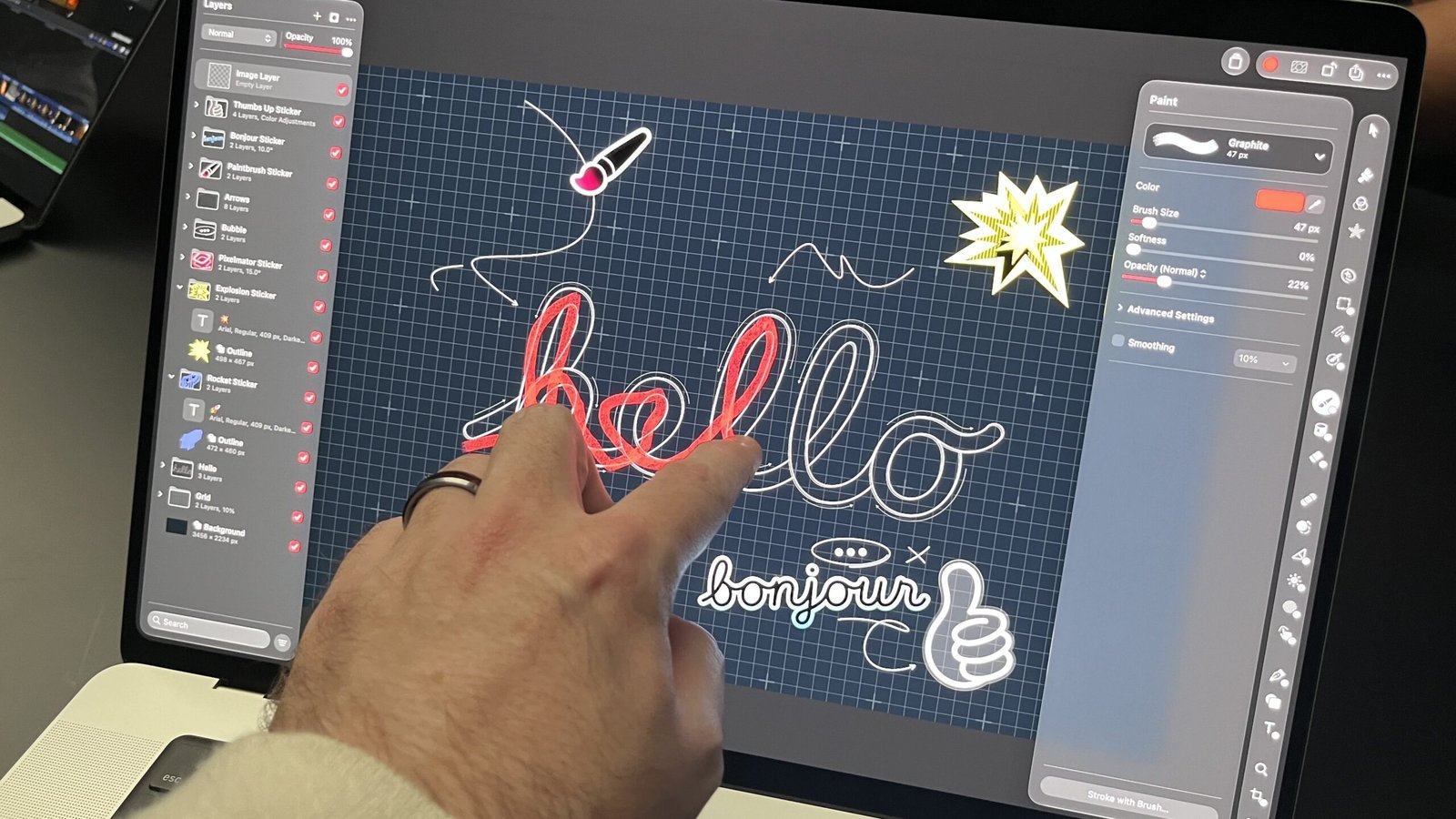
LOS ANGELES—When it comes to touch screens on laptops, Apple has finally decided to take its own advice and “think different.”
Touch-display input finally made it to a MacBook, and it took an overhauled MacBook Pro to get there. For years, Apple questioned the necessity and efficacy of laptop touch screens but worked on implementing the technology—both behind the scenes and in the open—through its iPhone and iPad product lines.

(Credit: Joe Osborne)
Now it has come home to laptops, and Apple calls the result the MacBook Pro with PROLED XDR Display. It comes in 14-inch and 16-inch sizes. And it is arguably the best implementation of a touch screen on a laptop display, at least in my estimation. And I’ve poked and prodded dozens, if not hundreds, of them over the years.
It’s simply the swiftest, most responsive touch screen I’ve had the joy of playing with, and it doesn’t stop there. Apple also used this opportunity to introduce tandem OLED pixel technology to its MacBooks for the first time, nailing the implementation with deeper blacks and more vibrant colors than I’ve seen on any OLED laptop so far.
So, are these upgrades worth paying an additional $900 for the 14-inch model, or an extra $800 for the 16-incher? At PCMag, we haven’t yet had the time or opportunity to fully test these new systems, so that call is up to you for now. Both are available for preorder at $2,899 and $3,399 to start, for the 14-inch and 16-inch models, respectively. As of right now, if I had the cash, I wouldn’t mind splashing out based on what I saw today at Apple’s Los Angeles “Pro and Tell” showcase.
Preorders for the New Touch-Screen MacBook Pros…


Design: Checking All the Boxes of a Redesign
This new MacBook is about more than just the display panel. Before even tapping away on that, the first big change I noticed is how much thinner and lighter the new MacBook Pro models are. The 14-inch system now measures 0.59 inch thick and weighs just 3 pounds, a half-millimeter thinner and half a pound lighter than before. Compared with the current model’s 0.61-inch thickness and 3.4-pound weight, this is a marked improvement. The 16-inch model is now just 0.63 inch thick and weighs 4 pounds, 0.7 pound lighter and nearly a millimeter thinner.

(Credit: Joe Osborne)
How did Apple achieve this? The company gives the PROLED XDR Display (the new panel) most of the credit, as OLED eliminates the need for screen-backlight hardware. Apple also made the metal frame a little less dense as a result. As for how it feels in hand, the 14-inch MacBook Pro feels like a MacBook Air.
The rest of the design, in terms of materials used, feels like every MacBook Pro of the past several years. However, Apple brought back its illuminated lid logo, a welcome return to form that actually required some development work on Apple’s part to reincorporate. Previous versions of this luminous logo relied on the screen backlight to provide the illumination. Without any screen backlight here, Apple had to add one just to light up this feature, and it works in tandem with the screen brightness to keep the flip side (the display panel) looking uniform.

(Credit: Joe Osborne)
Apple’s Magic Keyboard returns, as does the Force Touch trackpad, and both feel just as quick and responsive as they’ve always been. I was able to achieve my maximum typing speed with ease, even from a squished, awkward angle in Apple’s crowded demo area at this venue.
Despite changes in thickness and weight, the new MacBook Pro’s connectivity suite remains unchanged across both models. You still get multiple Thunderbolt 5 ports, HDMI, an SD card reader, a headphone jack, and a MagSafe charging port as before.

(Credit: Joe Osborne)
All told, Apple’s latest MacBook Pro design is remarkable for what’s been done both inside and out. It’s everything you want from an updated laptop: It’s thinner, it’s lighter, and it has more features than ever—even that light-up logo on the lid for style. And you do get a color choice: As before, the new MacBook Pro laptops come in Space Black or silver.
Display: Touch and PROLED XDR Mark a New Era for the MacBook Pro
This is the big change that Apple is emphasizing, and I agree with that focus: a touch screen on a MacBook, at long last. It took many years and much cajoling from fans and customers to reach this point, and so all eyes are on the new MacBook Pro’s PROLED XDR Display.

(Credit: Joe Osborne)
As for the nitty-gritty: The new 16-inch (really, that should be “16-inch-class”) MacBook Pro panel is larger than before, thanks to slimmed-down bezels that allow for a bigger panel within the same overall chassis dimensions. It’s now, in fact, a 16.3-inch screen. (Meanwhile, the 14-inch model simply shrinks a bit in width while staying 14.2 inches.) While the display resolutions amount roughly to 3K in either case, they both achieve 254 pixels per inch.
The new PROLED screens shine with up to 2,000 nits of brightness and refresh at up to 120Hz using Apple’s ProMotion technology. Apple’s MacBook Pro configurator also offers the option for Apple’s nano-texture finish, for better visibility under harsh lighting conditions.
All About the MacBook Pro’s OLED Panel
OLED (defined as “organic light-emitting diode”) directly lights or dims each pixel itself, rather than relying on a broad-spanning backlight, as IPS panels do. This helps generate superior color coverage and deeper black levels than traditionally lit IPS or LED panels can.

(Credit: Joe Osborne)
So, how does Apple’s implementation work? This one is actually a Tandem OLED panel, which stacks two OLED layers on top of each other. Apple is quite proud of this development, showing me in great detail the many minutely thin layers of the PROLED XDR screen in a behind-closed-doors demonstration. The result brings 100% AdobeRGB coverage to MacBook Pro screens for the first time, in addition to maintaining complete P3 color-gamut coverage.

(Credit: Joe Osborne)
Apple cites a sky-high 10,000,000:1 contrast ratio for this new panel. Ratios in the millions aren’t uncommon with OLEDs due to their “true” black tones. (OLED pixels turn wholly off when black is required.) To my eye, it’s clear that Apple achieved that 10,000,000:1 contrast ratio while also maintaining good brightness; blacks stay black regardless of how bright you set the panel, and the colors pop extremely well. Apple is bold enough to call this a “reference-level” display in a laptop, which will be a boon for mobile content creators at every level. (It made the same claims around the original Pro Display XDR desktop panel back in its day.)
Dynamic Island Comes to a MacBook Laptop
The new MacBook Pro display also uses Apple’s Dynamic Island sub-screen camera feature, which first emerged on its iPhones. Personally, I didn’t have any issues with the existing notch for the FaceTime camera, as it didn’t take up any usable space to begin with, jutting typically into a top menu bar. However, the Dynamic Island was implemented here with lots of care.

(Credit: Joe Osborne)
It’s central to the product, serving as the new home for the macOS search function, as well as for Siri AI prompts. Pressing Command+Space still works, but a simple swipe on the screen from the Dynamic Island does the same thing. The fact that the Dynamic Island lives right where the outgoing notch did, within the taskbar area, helps with this transition immensely.
The New MacBook Pro Touch Screen: You’re So Sensitive
Finally, the touch controls represent a sea change in MacBook and macOS design. But how does touch work on a MacBook screen? In my short time with the new display, I find it extremely responsive and smooth. The 120Hz refresh rate likely does a lot to make that so. I swiped through a gallery of photos with impressive speed, and manipulated all sorts of in-screen content across various apps as if I were using an iPad.
I was told that developers should have an easy time implementing these touch controls in their apps (to the tune of just a few days). Otherwise, touches will automatically be registered as clicks, so at least every app, even if not touch-optimized, should include some level of touch functionality out of the box.
Recommended by Our Editors

(Credit: Joe Osborne)
Touch controls on a MacBook may have been a long time coming, and may not have happened at all, if not for new-guard leadership steering the product in this direction. Regardless of how I feel about the bigger-picture necessity of touch screens, this feels like the most intuitive and effective implementation of touch-input controls that I’ve seen in a laptop.
Specs Check: No M6 Silicon Under the Keys
As anticipated, the new MacBook Pro models stick with the existing Apple M5 Pro and M5 Max processor options. The base-level M5 Pro comprises a 15-core CPU (five super cores and 10 performance cores) and a 16-core GPU. Both the top-level M5 Pro and the base-level M5 Max have 18-core CPUs with six super cores and 12 performance cores, but they differ significantly in GPU capacity.
The souped-up M5 Pro has a 20-core GPU, while the M5 Max starts at 32 GPU cores and can jump to 40 with an added-cost upgrade. Both of these chips come with Apple’s 16-core Neural Engine to assist with AI tasks via Apple Intelligence and Siri.

(Credit: Joe Osborne)
Whereas MacBook Pro configurations with the M5 Pro can start with as “little” as 24GB of unified memory, the M5 Max starts out with 32GB and has room for up to 128GB of the tech world’s most precious resource. As for storage, the M5 Pro starts with a 1TB solid-state drive and goes up to 4TB, while the M5 Max starts at 2TB and goes up to 16TB.
As for supporting silicon, the new MacBook Pro models come with the N1 wireless chip for Wi-Fi 7 and Bluetooth 6, which has become the new standard for wireless connectivity on Apple’s top-end devices.
My Early Verdict: The New Touch-Screen Laptops to Beat
Apple didn’t have to reinvent its entire design ID with these overhauled MacBook Pro laptops…and it didn’t. Instead, it focused on what matters most: the screen, and the portability. In those respects, this is a brand-new laptop through and through, hitting all the major areas I would have expected from a revamped MacBook Pro.
Touch controls for the first time ever on a MacBook laptop make sense in a professional capacity, pairing the snappy refresh rate of ProMotion and deep color coverage of Apple’s PROLED XDR implementation of Tandem OLED. At least from this first glance, Apple has cooked up the absolute best laptop screen in town once again, admittedly having slipped a bit in that regard recently, as OLED made inroads into the laptop world.

(Credit: Joe Osborne)
Apple’s response to these developments, old and new, looks like the wait may have been worth it. I’ve not seen any other laptop to date deliver such a panel-quality coup with both OLED and touch in one. Now I just have to wonder: Which MacBooks might get this screen next, and how might macOS leverage this new input method? Could we eventually get a touch-enabled MacBook Air?
If you want the best touch-screen laptop that money can buy, these MacBook Pro laptops look poised to become major contenders. Now, you just have to decide whether that’s worth a substantial price increase over the non-touch, non-OLED MacBook Pros: to start, $2,899 for the 14-inch model, or $3,399 for the 16-incher.
Both versions of the laptop are available for preorder now, and they go on general sale starting on Friday, Nov. 6. Come back here in about a week for my fully tested review, more impressions, and my final verdict on each model.
About Our Expert

Joe Osborne
Deputy Managing Editor, Hardware
Experience
After starting my career at PCMag as an intern 16 years ago, I’m back as one of its editors, focused on managing laptops, desktops, and components coverage. With more than 15 years of experience, I have been on staff and published in technology review publications, including PCMag (of course!), Laptop Magazine, Tom’s Guide, TechRadar, and IGN. Along the way, I’ve tested and reviewed hundreds of laptops and helped develop testing protocols. I have expertise in testing all forms of laptops and desktops using the latest tools. I’m also well-versed in video game hardware and software coverage.
Leave a Reply