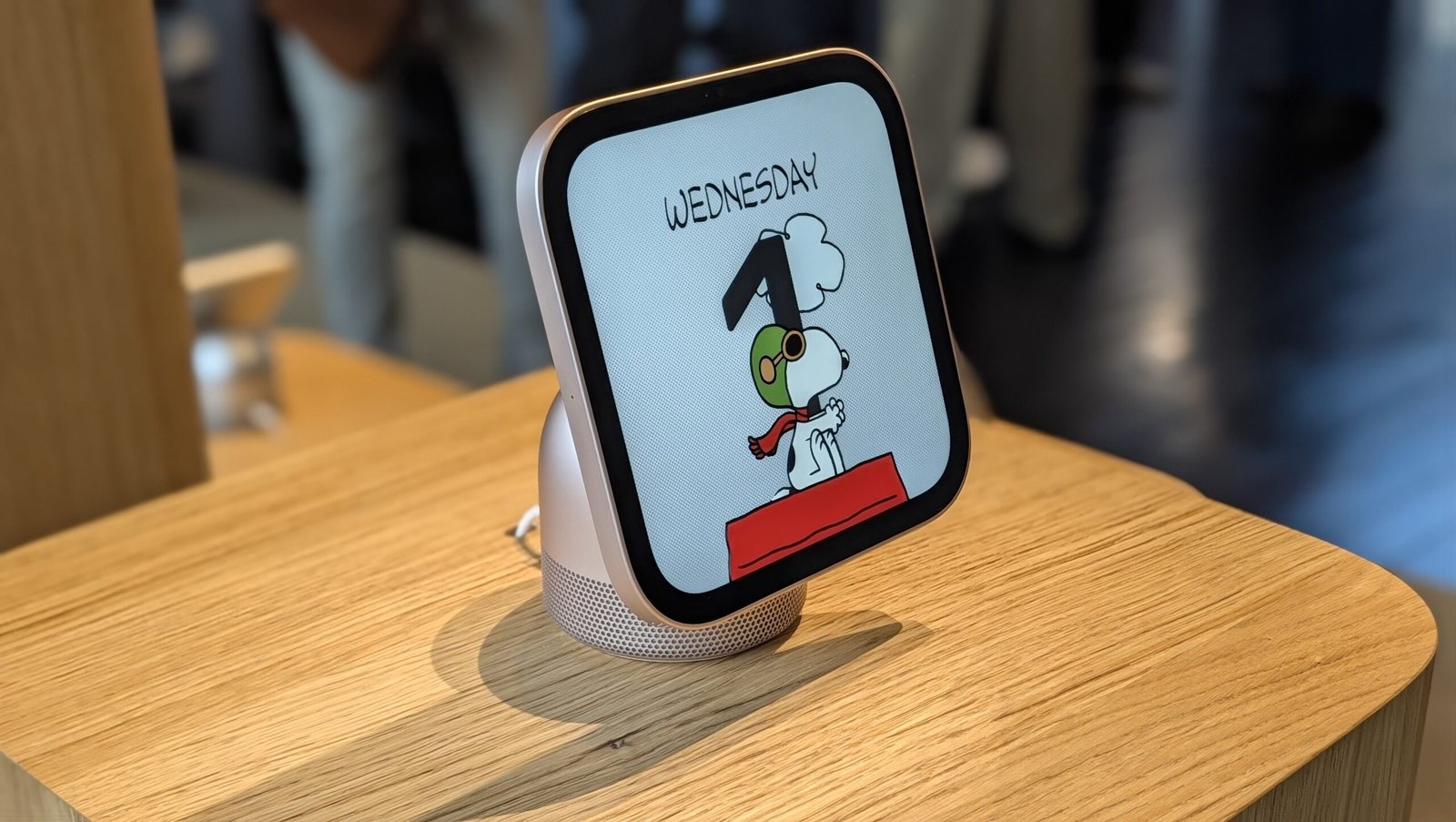
I got a first look at the HomeView during Apple’s “Welcome Home” event, and unlike early smart displays from Amazon and Google, it doesn’t feel like a first-gen prototype. The HomeView is polished, capable, and ready to take on the market’s heavy hitters right out of the gate.
But one design choice instantly stands out: Instead of the standard widescreen display found on almost every tablet and smart hub, the HomeView has a square screen. While “Think Different” is built into the company’s DNA, this 1:1 aspect ratio could make streaming video a letterboxed nightmare.
Why Go Square in a Widescreen World?
Most streaming services like Netflix and YouTube rely on standard horizontal video, which will have to shrink significantly to fit the HomeView’s screen. That likely means heavy letterboxing on the top and bottom—reminiscent of watching widescreen movies on an old square TV.

The square shape looks cool, but it might make watching videos awkward (Credit: Andrew Gebhart)
Vertical video isn’t exempt from compromise, either. Platforms like Instagram Reels and TikTok are built for tall screens, though a 1:1 box handles vertical feeds slightly better than a traditional widescreen layout would.
The HomeView’s square display almost feels like a generational compromise. By picking a shape halfway between horizontal landscape and vertical feeds, Apple might be attempting to balance the habits of a shared household: parents get passable widescreen video, kids get usable social feeds, and everyone tolerates a few black bars.
Of course, native streaming options might be sparse at launch beyond Apple’s own News and Podcasts apps. But with Safari built in and AirPlay support ready to go, beaming content to the screen should still be effortless.
Preorder the Apple HomeView

The OS Behind Apple’s Design Choice
The square screen feels like a deliberate effort to align the HomeView with the Apple Watch and CarPlay rather than the iPhone or iPad. In fact, the HomeView’s proprietary operating system looks like a hybrid of watchOS and CarPlay, with software capabilities tied heavily to the latter—if an app works with CarPlay, it will run on HomeView.
On a smartwatch, a square display makes perfect sense: It fits more text into a small wrist frame than a circular screen can. On a tabletop display, the advantage is less obvious. But Apple is clearly leaning on its watchOS playbook, particularly with ambient mode. When idle, the HomeView functions as a photo frame, using smart cropping and Liquid Glass clock typography that dynamically arranges around subjects—much like the Apple Watch’s Photos face.

Photos on the HomeView (Credit: Andrew Gebhart)
While photos aren’t taken in a 1:1 aspect ratio, Apple’s automatic cropping makes images pop. It’s a clever software trick to justify the hardware, even if Google’s Nest Hub achieves a similar picture frame charm on a standard widescreen panel.
Beyond Video: Where the Square Screen Works
When you move past video streaming, the 1:1 aspect ratio transitions from a drawback to a net neutral.
For core smart home tasks, the square layout feels surprisingly natural. Interface panels, calendar views, text threads, and interactive recipe cards fill the full screen without feeling cramped or awkwardly stretched. The step-by-step recipe mode—complete with integrated timer widgets—is just as easy to read as on horizontal displays from Amazon and Google.
Recommended by Our Editors

Smart home controls on the HomeView (Credit: Andrew Gebhart)
Where the square screen gets tricky again is live video feeds, though the impact varies across different types of media. While FaceTime dynamically crops group calls to make the 1:1 frame barely noticeable, most wide-angle security camera feeds will inevitably lose their edges unless they are letterboxed. And while 1:1 aspect ratios are typically ideal for package-tracking doorbells, Apple’s co-announced LG Video Doorbell actually utilizes dual wide-angle lenses instead of a native square sensor.
Ultimately, for dashboard navigation, privacy controls, and kitchen recipes, the square display holds its own. It’s only when motion video enters the frame that Apple’s design bet feels limiting.

A video doorbell feed on the HomeView (Credit: Andrew Gebhart)
A Bold Design With Big Trade-Offs
Based on my early look, the Apple HomeView is a stunning, thoughtfully crafted smart display. But its unique aspect ratio remains its biggest question mark. While the square shape offers a sleek aesthetic and a clever middle ground for different video formats, it actively compromises one of the primary reasons people put a screen in the kitchen: watching video while tackling chores.
Still, taking an unconventional approach to an established category is classic Apple. Whether that square screen turns out to be a brilliant compromise or a frustrating flaw will depend on how it holds up in daily life.
The HomeView is available for preorder now and hits shelves on Nov. 13 for $299, in both countertop and wall-mounted configurations. I’ll be putting it through its paces in a full review soon, so stay tuned.
About Our Expert

Andrew Gebhart
Senior Writer, Smart Home and Wearables
Experience
I’m PCMag’s senior writer covering smart home and wearable devices. I’ve been reporting on tech professionally for nearly a decade and have been obsessing about it for much longer than that. Prior to joining PCMag, I made educational videos for an electronics store called Abt Electronics in Illinois, and before that, I spent eight years covering the smart home market for CNET.
I foster many flavors of nerdom in my personal life. I’m an avid board gamer and video gamer. I love fantasy football, which I view as a combination of role-playing games and sports. Plus, I can talk to you about craft beer for hours and am on a personal quest to have a flight of beer at each microbrewery in my home city of Chicago.
Leave a Reply