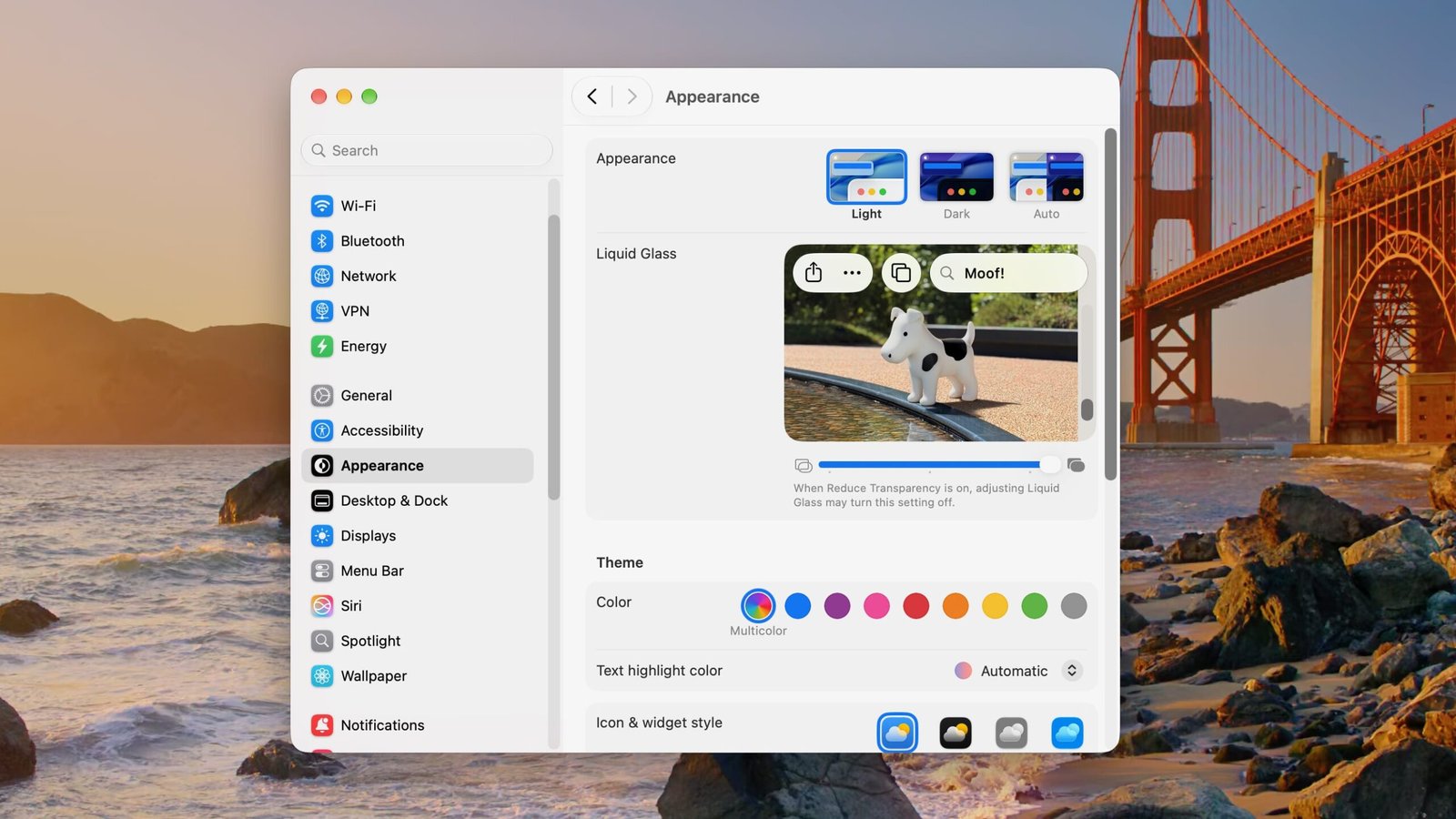
Apple’s newest operating systems, out today, hide a throwback reference to one of the more whimsical bits of one of the company’s oldest OS releases: Clarus the dogcow.
Mac users with enough gray hair (or no hair left at all) should remember Clarus as a bitmapped animal with the spots of a cow and approximately the head and the tail of a dog, which would visualize how your choice of print settings affected how your text appeared on a page.
More than four decades after the dogcow’s debut in a page-setup dialog for Apple’s LaserWriter printer—with a moniker nodding to the firm’s Claris productivity-software subsidiary—you can now catch this critter in settings dialogs for Apple’s less-than-universally-beloved Liquid Glass interface-transparency option.
To see this Easter egg in iOS 27, iPadOS 27, and macOS 27 Golden Gate, open Settings > Appearance > Liquid Glass, and keep scrolling down repeatedly until the word “Moof!” starts to appear in the sample image’s search box.
As longtime Mac types can attest, “Moof!” is the sound a dogcow makes instead of “woof” or “moo,” since it’s part dog and part cow. Here, the word appears, at first in rainbow colors, below a picture of a non-bitmapped dogcow next to a pool.
While you’re in this dialog, you can also adjust the slider to control how transparent menus and other interface elements appear, a source of considerable grumbling among users of macOS 26 Tahoe.
The definitive description of Clarus appears in a mock technical note written by Apple developer-support staffer Mark Harlan in 1989 that has long since vanished from the web. “Dogcows, by their nature, are not all dog, nor are they all cow, but they are a special genetic hybrid,” Harlan wrote. “They are rarely seen in the wild. Since dogcows are two-dimensional, they will stand facing a viewer ‘on edge’ to avoid being seen.”
The note also alludes to the dogcow’s role in illustrating which way your text would appear on the page if you adjusted various dialogs. “Like any talented dog, it can do flips,” he praised the dogcow. “Like any talented cow, it can do precision bitmap alignment.”
In a 2019 interview recorded for the Computer History Museum in Mountain View, graphic designer Annette Wagner explained how she created the dogcow by adopting a dog icon created by Susan Kare for the original Mac’s Cairo symbols-only font. “We needed some kind of graphic that would show flipping horizontal, flipping vertical, 2% reduction,” she said.
Recommended by Our Editors
With significant alterations to make it clear to the user when this icon was reversed, flipped, or shrunk by a specific percentage, her work survived an unnamed marketing type’s initial thumbs-down: “Everyone’s going to think this is doggy software!”
For years, a Clarus sculpture held a prominent spot in the icon garden outside the Apple headquarters buildings, predating Apple Park’s spaceship structure. But this icon fell out of favor over Apple’s long series of reinventions.

Dogcow from macOS Ventura Page Setup dialog (Credit: Apple)
The dogcow, however, made a reappearance in page-setup dialogs in 2022’s macOS Ventura as a smoothly drawn figurine and continues to adorn those dialogs in Golden Gate. To see one, choose “Page Setup” from the File menu in a writing app like Apple’s built-in TextEdit. A year ago, Clarus also resurfaced in an optional face for the Apple Watch Series 11’s Hermès edition.
We don’t know when this Mac mascot began showing up in beta versions of Apple’s newest operating systems, but MacRumors analyst Aaron Perris shared a video of it on X on Sept. 9, after which Macworld’s Roman Loyola wrote up that finding and offered this conclusion: “It’s fun to see Apple add a little whimsy to its software.” True.
About Our Expert

Experience
Rob Pegoraro writes about interesting problems and possibilities in computers, gadgets, apps, services, telecom, and other things that beep or blink. He’s covered such developments as the evolution of the cell phone from 1G to 5G, the fall and rise of Apple, Google’s growth from obscure Yahoo rival to verb status, and the transformation of social media from CompuServe forums to Facebook’s billions of users. Pegoraro has met most of the founders of the internet and once received a single-word email reply from Steve Jobs.
Leave a Reply