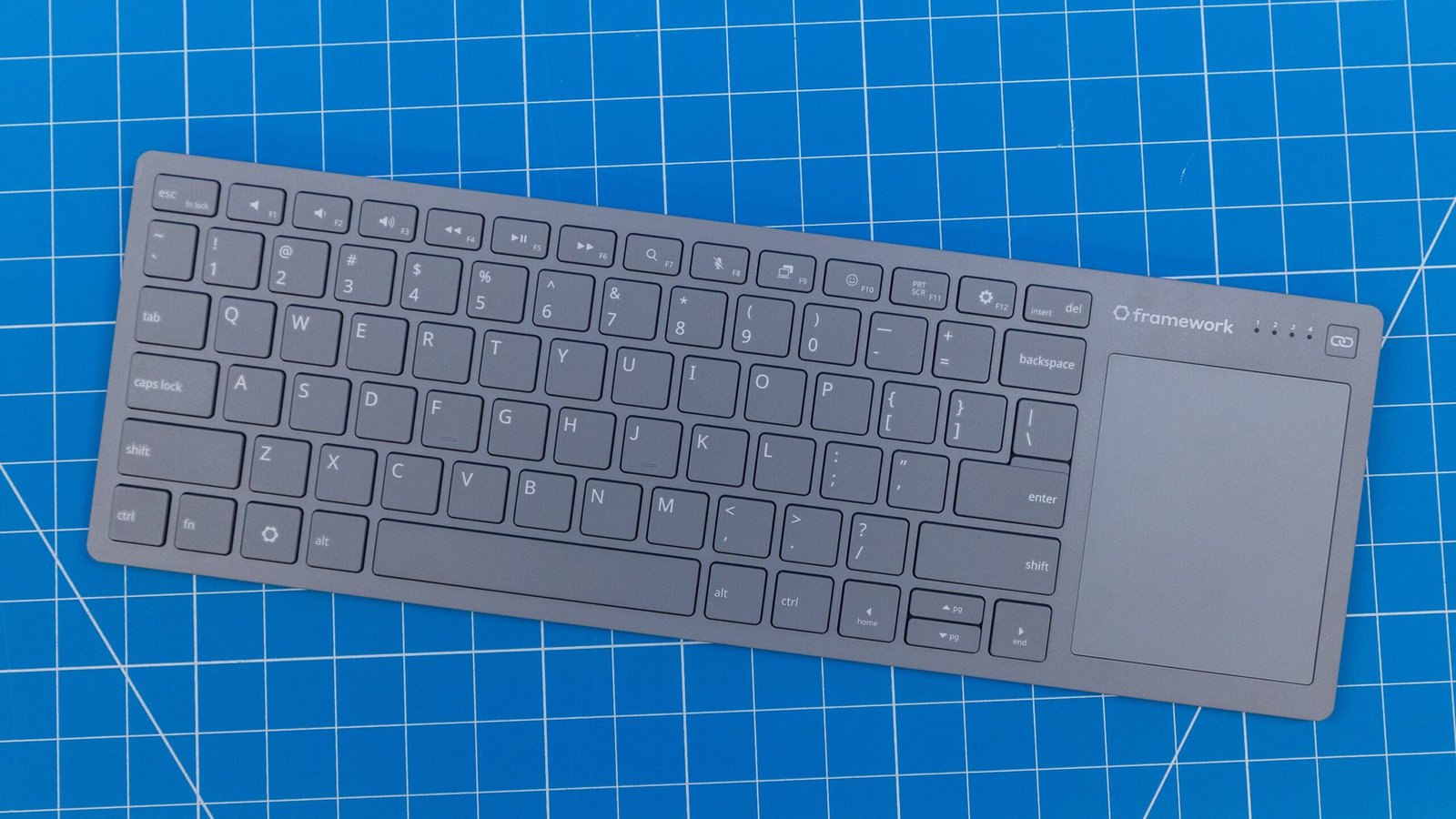
The first Framework laptops arrived in 2021, and in just five years, the company has proven itself a worthy competitor, especially in the modular 13-inch and 16-inch categories. But Framework isn’t stopping at laptops, broadening its horizons with the upcoming Framework Wireless Touchpad Keyboard ($99.00). Designed to replace the cheap keyboards found in many home entertainment centers, it comes with a built-in touchpad, Bluetooth and 2.4GHz wireless connectivity, and a USB-C port for wired use. Although it’s not as modular as its laptop cousins, the keyboard has a replaceable battery and uses open-source ZMK firmware so you can make it your own.
Framework reached out ahead of the keyboard’s debut next year to give me some hands-on time with a preproduction unit. Even in its early state, the keyboard has impressive depth beneath the surface. At first glance, it’s a handy 2-in-1 cordless keyboard, but DIY enthusiasts and custom keyboard junkies will love its open-source firmware and the potential it holds.

Framework Wireless Touchpad Keyboard

(Credit: Joseph Maldonado)
Wait, Where’s the Mouse? It’s Built In
Out of the box, the keyboard looks unassuming: a simple gray chassis with white legends, measuring 0.6 by 14 by 4.6 inches (HWD) and weighing just 1.06 pounds. In terms of layout, it resembles a 65% keyboard but with a touchpad that adds a few extra inches of width.
Framework states that the keys are lifted straight from its laptops. They’re chiclet-style, low-profile keys with just enough tension to make typing satisfying, likely thanks to the thin steel plate tucked beneath them. It isn’t as thin as, say, an Apple Magic Keyboard, but as someone who has never been a fan of Apple’s wafer-thin boards, it won me over fairly quickly.

(Credit: Joseph Maldonado)
The touchpad measures 2.7 by 3.3 inches, which gave me enough space to fit three fingers comfortably. The pad is smooth and responsive, supporting multi-finger gestures on Linux and Windows, as well as most Mac gestures in Mac Mode. It took a few strokes to drag the mouse from one side of the screen to the other on my 32-inch monitor, which proved tiring over time, so I was eager to increase the sensitivity, but I couldn’t—at least not on this preproduction unit.
Turning it over, the keyboard sports a see-through casing and two rubber strips that run its length. There are no adjustable feet, but the top half of the back is slightly elevated, giving it tilt. While I prefer adjustable feet, most thin keyboards I’ve tested lack additional height adjustments, so the bump is better than nothing. It’s not dissimilar to the Logitech Signature Slim Solar+ K980 Keyboard in that regard, another slim, wireless keyboard. Also tucked away on the back is a 2.4GHz USB-A dongle (more on that in a bit).
In use, the Wireless Touchpad Keyboard’s layout reminds me of ergonomic boards like the RollerMouse and SliderMouse, though hardly as avant-garde. The slender, lightweight frame and wireless connectivity make it easy to recommend if you’re traveling or need to quickly connect a keyboard and mouse to a device.

(Credit: Joseph Maldonado)
Built for the Couch, Great Everywhere Else
Framework designed this keyboard to replace the cheap keyboard-and-mouse combos that entertainment enthusiasts keep in their living rooms for HTPCs (home theater PCs), smart TVs, and devices like the Steam Machine. This is the keyboard to break out when you need to handle prompts that a typical TV remote or game controller can’t handle, or can only handle clumsily (think navigating settings menus or typing in-game messages).

(Credit: Joseph Maldonado)
These use cases aren’t as niche as you might think. I review many gaming handhelds, and one thing they all have in common is that navigating Windows is frustrating. However, thanks to the keyboard’s included touchpad, I didn’t need to fish around for a spare mouse or keyboard. I simply connected the Framework to access a mouse and keyboard, effectively killing two birds with one board.
I got excited thinking of the other possibilities. I play Final Fantasy XIV across multiple platforms, and I think the Framework would make an excellent keyboard to pair with the PlayStation 5. Although the MMO is very playable with a PlayStation 5 controller, chatting with friends and hopping between menus is still best done with a keyboard and mouse. While I couldn’t connect the keyboard wirelessly due to the PlayStation’s lack of Bluetooth 6.0 support, Framework’s wired option provides a quick, easy way to navigate menus and communicate with party members without clearing desk space for a separate keyboard and mouse.

(Credit: Joseph Maldonado)
The keyboard is pretty versatile. You can connect via a USB-C cable or wirelessly using Bluetooth or 2.4GHz. The keyboard supports up to four different wireless connections at once, so you can easily hop between devices with a press of the channel switch button located just above the touchpad.
A Keyboard You’re Actually Allowed to Hack
Although the keyboard isn’t as modular as any of the Framework laptops, it offers a fair bit of customization not normally found in a board of this type. For example, you can easily remove the 1,200mAh rechargeable battery. In terms of battery life, Framework states that the keyboard will last more than a month with daily use and more than a year when idle. My preview unit came with a USB-A Expansion Card (available for purchase separately in early 2027, though the price isn’t confirmed), so you can use the 2.4GHz USB-A dongle on a system with USB-C ports.
Recommended by Our Editors

(Credit: Joseph Maldonado)
What the keyboard lacks in physical modularity, it makes up for in software. What really sets the Framework apart from other keyboards is its customization options. The Framework uses ZMK Studio, an open-source remapping tool accessible in your web browser—no download required. What’s more, because the firmware is built on an open-source fork of ZMK, advanced users can dive deeper and edit the keyboard’s config directly, changing anything the tool doesn’t already cover and giving them complete version control.
Framework plans to take this a step further. The keyboard’s control board schematic, pinout, and bootloader will be published on GitHub. So if you buy the control board, you can mimic the Wireless Touchpad Keyboard’s functionality and essentially make it the “brain” of your own custom keyboards. The framework will also enable open-source surface CAD, allowing you to design and 3D print mounts and accessories.

(Credit: ZMK Studio)
However, much of this is still in early stages, so I wasn’t able to see how it fares in a real-world scenario. Framework also promises that updates will be available via a web page (accessible through Google Chrome or Microsoft Edge), but the updater is still in development.
Early Verdict: Worth the $50 Deposit?
As of this writing, Framework plans to release the Wireless Touchpad Keyboard in Q1 2027 for $99.00, and you can preorder it now with a fully refundable $50 deposit.
Even at this early stage, the Framework Wireless Touchpad Keyboard shows plenty of potential. Its open-source firmware and swappable parts will appeal to tinkerers and the custom keyboard crowd, while its built-in touchpad and multi-device support make it a great fit for people like me who want a single universal keyboard for working and playing across many devices. A few rough edges remain, like the lack of touchpad sensitivity controls, but there’s still time for Framework to smooth them out before launch, and I look forward to getting my hands on the finished product.
About Our Expert

Zackery Cuevas
Writer, Hardware
Experience
I’m a PCMag reviewer and ISF-certified TV calibrator focused on computer accessories, laptops, gaming monitors, and video games. I’ve been writing, playing, and complaining about games for as long as I remember, but it wasn’t until recently that I’ve been able to shout my opinions directly at a larger audience. My work has appeared on iMore, Windows Central, Android Central, and TWICE, and I have a diverse portfolio of editing work under my belt from my time spent at Scholastic and Oxford University Press. I also have a few book-author credits under my belt—I’ve contributed to the sci-fi anthology Under New Suns, and I’ve even written a Peppa Pig book.
Leave a Reply