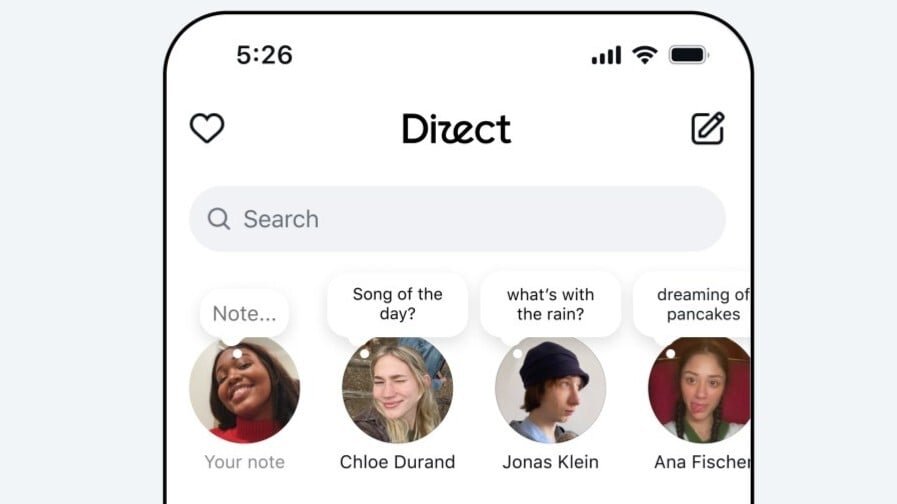
Messenger and WhatsApp aren’t enough for Meta: it’s now testing a third standalone messaging app called Direct.
This alternative is more closely connected to Instagram than Meta’s other services, resembling a hybrid of the photo-sharing app and Messenger. It has a user interface similar to Instagram’s main chats and brings Messenger’s multimedia features to individual chats.
Meta calls this a “simple, fun” way to talk to your friends and family, with a focus on tools that add playful elements to conversations. For example, you can quickly draw or sketch an image within a chat or add voice effects to audio files, such as making it sound like you’ve gone underwater
Other Meta messaging features include custom stickers, themes to personalize chat backgrounds, and notes at the top of your feed to share quick thoughts with all your contacts. The app is designed for both one-to-one and group conversations.

(Credit: Meta)
Not everyone needs an Instagram account to be involved: you can sign up with your email or phone number. Meta says, “Only your contacts can start a chat with you or add you to a group” if you use this method, meaning you’ll need to manually add a contact to talk to them.
If you do use Instagram, you can sign in using your own account and sync messages across both apps. This means you won’t need to read messages on each version to make unread notifications disappear.
Meta’s test is rolling out to all customers across Android and iOS in both Türkiye and Thailand, with no clear plan of action for what will happen next. This trial may see Meta decide to roll out the app further.
Recommended by Our Editors
Although not confirmed by Meta, the design and features suggest Direct may be intended for younger users who embrace Instagram but don’t necessarily use WhatsApp or Messenger.
The head of Instagram, Adam Mosseri, recently said he believes it will be “pretty challenging” to make a version of Instagram that works well on Apple’s new iPhone Duo foldable phone. Mosseri said much of Instagram has been designed for a tall vertical screen, noting that moving the nav bar to the right-hand side complicates this, as it would mean two layers of buttons in some tools.
He said, “Now we’ve got this double stack of buttons that doesn’t feel great and that we need to reconsider. It’s a lot of that kind of thing.”
About Our Expert

Experience
I’ve been a journalist for over a decade after getting my start in tech reporting back in 2013. I joined PCMag in 2025, where I cover the latest developments across the tech sphere, writing about the gadgets and services you use every day. Be sure to send me any tips you think PCMag would be interested in.
Leave a Reply